
Accessibility Testing
Test your digital accessibility
With Eye-Able, you can test websites, apps, and PDFs using both automated and manual checks and spot all accessibility barriers at a glance. We deliver clear action recommendations and prioritized issue lists, so you know exactly what to fix first.
:no_upscale():format(png))
Empowering 20,000+ websites on their accessibility journey
:quality(95):no_upscale():format(png))
:quality(95):no_upscale():format(png))
:quality(95):no_upscale():format(png))
:quality(95):no_upscale():format(png))
:quality(95):no_upscale():format(png))
:quality(95):no_upscale():format(png))
:quality(95):no_upscale():format(png))
:quality(95):no_upscale():format(png))
:quality(95):no_upscale():format(png))
:quality(95):no_upscale():format(png))
:quality(95):no_upscale():format(png))
:quality(95):no_upscale():format(png))
:quality(95):no_upscale():format(png))
:quality(95):no_upscale():format(png))
:quality(95):no_upscale():format(png))
:quality(95):no_upscale():format(png))
:quality(95):no_upscale():format(png))
:quality(95):no_upscale():format(png))
:quality(95):no_upscale():format(png))
:quality(95):no_upscale():format(png))
:quality(95):no_upscale():format(png))
:quality(95):no_upscale():format(png))
Why digital accessibility is essential for businesses
Testing digital accessibility reduces legal risks, expands your reach, and makes websites, apps, and PDFs usable for everyone. Eye-Able delivers fast, transparent testing — combining automated scans, software-guided checks, and testing by people with disabilities.

Meet legal accessibility requirements

Reach all users
“How can I quickly tell whether our digital services are accessible?”
Your e-commerce manager, right now.
Comprehensive accessibility testing with Eye-Able: where AI meets expert insight
With Eye-Able, you can test your digital services in just a few simple steps. Automated scans, software-guided checks, and manual testing by people with disabilities help you uncover barriers efficiently, regardless of your level of experience.
:no_upscale():format(png))

Automated scans powered by over 125 accessibility checks

Intuitive to use for every level of experience

Powerful combination of automated and manual testing
The Eye-Able platform solutions for efficient accessibility testing
Spot accessibility issues instantly — directly on your page
Eye-Able Audit as a browser extension
With the Audit feature, you can automatically test websites directly in your browser. The extension highlights accessibility barriers and the affected code locations live on your page. Its intuitive interface makes accessibility testing easy regardless of your level of experience.
:no_upscale():format(png))
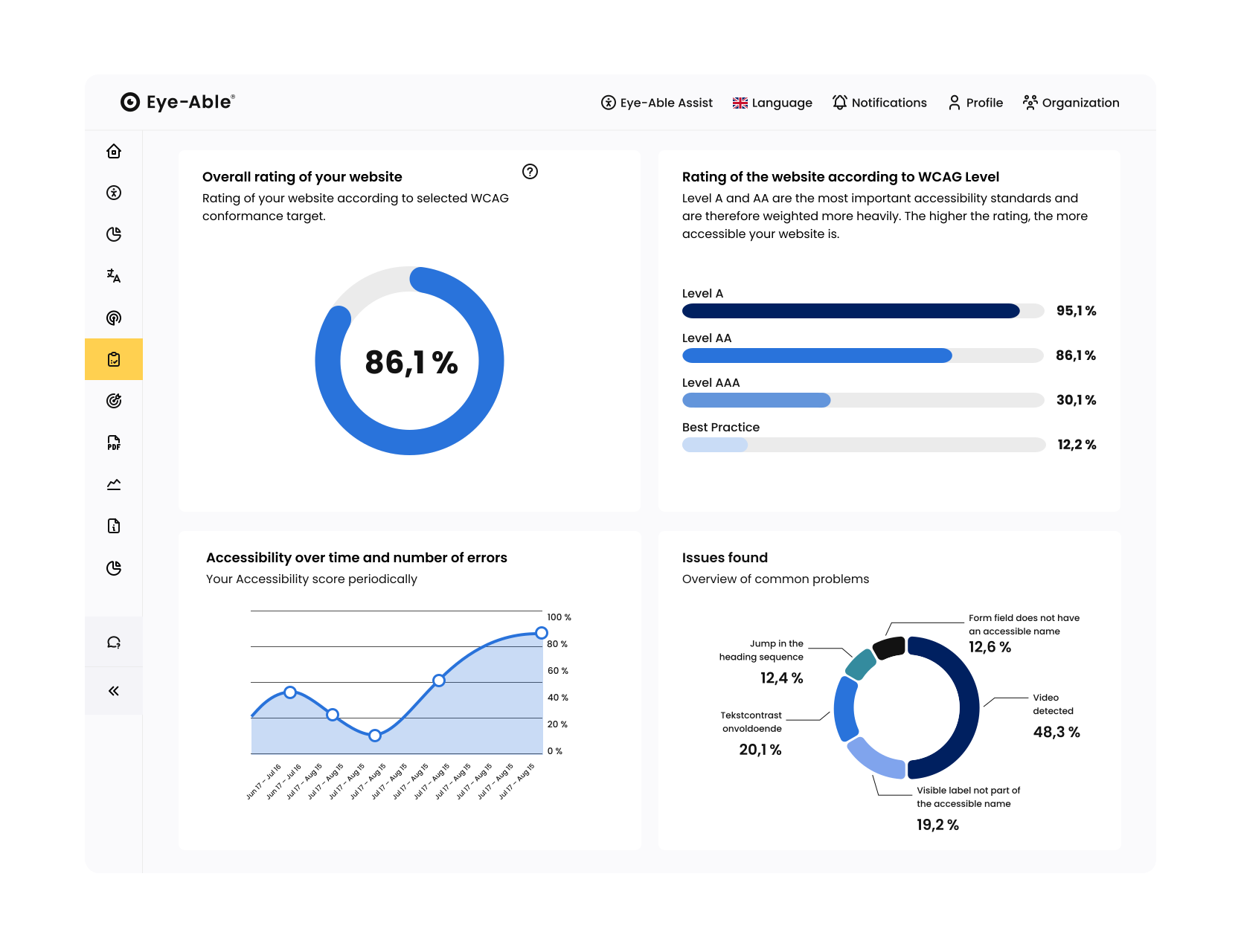
Progress, scores, and priorities all at a glance
Eye-Able Report in the Eye-Able Dashboard
The report shows your Eye-Able Score based on your defined goals and identified issues. You can also test dynamic content such as logins and forms. With built-in project management, you can assign tasks directly or connect issues seamlessly to Jira.
Guided testing for what automation can’t cover
Guided Testing in the Eye-Able dashboard
Software-guided tests close the gaps that automated checks can’t cover. Eye-Able walks you step by step through open accessibility questions with screenshots, extracted content, and clear instructions. This lets you test quickly and reliably, even without prior knowledge.
:no_upscale():format(png))
:no_upscale():format(png))
User perspective for truly inclusive accessibility
Manual tests by users with disabilities
People with disabilities test real-world usage scenarios and uncover barriers that automated tools can’t detect such as issues with clarity or navigation. All results are centrally collected and managed in the Eye-Able Dashboard.

An initial accessibility assessment through user testing by people with disabilities

Comprehensive accessibility testing with full documentation included
Verify legal accessibility compliance with confidence
Comprehensive accessibility testing by the Eye-Able expert team
The Eye-Able expert team audits websites and apps against WCAG, EN 301 549, and relevant national standards such as BITV/BFSG, ADA, or AGID. The result: structured reports (e.g. VPAT) with clearly prioritized recommendations for design, development, and management.
:no_upscale():format(png))
:no_upscale():format(png))
Audio and video content made accessible to everyone
Transcripts in the Eye-Able dashboard
With Eye-Able, you can check audio and video content for missing transcripts and add them directly. Create multilingual transcripts and automatically generate subtitles for videos. AI recognizes spoken words and visual context, and subtitles can be embedded directly into the video.
Deep insights into your content for improved performance
Web & Content Analysis in the Eye-Able dashboard
Identify broken links, analyze performance and SEO with Lighthouse, spot long loading times, detect spelling and readability issues, and check fonts for design or licensing problems, all in one place.
:no_upscale():format(png))
:no_upscale():format(png))
Create accessible PDFs with ease
PDF Scanner in the Eye-Able dashboard
With Eye-Able, you can test all PDFs on your website against PDF/UA and WCAG standards. Clear scores and reports highlight relevant issue clusters, while AI automatically fixes common problems such as missing tags, metadata, alternative text, and document structure.
Optimal contrast ratios for better accessibility
Contrast checker in the Eye-Able dashboard
In the Eye-Able dashboard, you can quickly and easily compare color contrast ratios. This helps you ensure they meet accessibility requirements, ideal when reviewing or refining your corporate identity.
:no_upscale():format(png))
Why customers trust Eye-Able
:no_upscale():format(png))
:no_upscale():format(png))
:no_upscale():format(png))
:no_upscale():format(png))
:no_upscale():format(png))
:no_upscale():format(png))

:no_upscale():format(png))
:no_upscale():format(png))
Start your accessibility journey with a free trial
Experience Eye-Able's complete platform with a 14-day free trial.
:no_upscale():format(png))
Frequently asked questions
FAQ on Accessibility Widget
Accessibility testing means systematically checking your website, app, or documents to ensure they are usable for people with disabilities. At Eye-Able, we combine three complementary testing approaches to give you a complete picture:
Automated tests: The fastest way to assess accessibility. Our software scans your code and instantly detects around 80% of common technical issues, such as missing alternative text for images or insufficient color contrast. This gives you quick insights and a solid foundation, with clear results available directly in the Eye-Able Report.
Software-guided tests: Some accessibility aspects require human judgment. Here, our software supports you step by step by guiding you through specific criteria. For example: “Is this heading meaningful?” or “Is this button label clear?” This allows you and your team to test deeper accessibility aspects, even without prior expertise.
Manual testing: For comprehensive quality assurance, experts or users with disabilities conduct targeted audits. These include keyboard-only navigation or screen reader testing to assess logical structure and real-world usability. Manual tests uncover the finer details that AI alone cannot reliably evaluate.
In addition, specialized tools such as the Contrast Checker, Web & Content Analysis, and PDF testing are available to examine specific aspects of digital accessibility in depth.
Digital accessibility isn’t a one-time task — it’s an ongoing process. Regular accessibility testing ensures that new content, updates, and design changes continue to include all users, not just some.
For public authorities and educational institutions, this has been a requirement for years. Since June 2025, the same obligation also applies to businesses. Ongoing testing helps you meet the requirements of the European Accessibility Act (EAA) reduce risk, and continuously improve usability for every target group.
For both public-sector bodies and private sector companies the key regulation, the European Accessibility Act (EAA), base their accessibility testing on WCAG 2.1 (Level AA) to meet the requirements of the EN 301 549 norms.
Eye-Able helps you implement these standards effectively and make your digital presence accessible to all users, so you can address legal requirements in a structured and targeted way.
Automated tools are highly efficient and can instantly detect around 80% of common technical issues. However, achieving truly comprehensive accessibility requires additional manual testing.
Aspects such as logical reading order, meaningful structure, or how content is interpreted by screen readers can be assessed far more accurately through human expertise. That’s why we recommend a hybrid approach: combining automated testing with manual checks to ensure the highest quality when testing for accessibility.
To maintain lasting accessibility and legal compliance — for example under the EAA — the right balance between continuous monitoring and in-depth reviews is essential:
Continuous monitoring (automated): Accessibility testing should be an integral part of your editorial and development workflows. Eye-Able supports this by automatically scanning your website for barriers every seven days. This weekly monitoring ensures that new content doesn’t introduce unnoticed accessibility issues for users.
Ad-hoc checks (when changes occur): Whenever new page templates are released or major functional changes are made to the code, accessibility should be tested directly within the development process.
Comprehensive audits (strategic): In addition to ongoing monitoring, a manual expert audit is recommended for major updates or relaunches. While software quickly detects technical issues, an expert audit ensures that complex interactions and navigation structures are logically accessible, especially for screen reader users.
This combination helps you stay compliant while continuously improving the accessibility of your digital services.
Yes, and it’s a critical part of a truly accessible website. Accessibility doesn’t stop at HTML - all documents you provide for download must also be readable by assistive technologies such as screen readers.
Here’s how we can support you:
PDF/UA compliance checks: We analyze your PDF files based on the international PDF/UA standard (ISO 14289-1) and relevant WCAG criteria.
Structural analysis: Our scans verify whether documents are correctly tagged. This is essential for screen readers to understand reading order, heading hierarchies, and table structures.
Metadata & image descriptions: We check whether document titles are properly set and whether all images include meaningful alternative text.
Seamless integration: During automated website scans, Eye-Able also detects linked PDF documents and lists all accessibility issues directly in your dashboard.
Why this matters: In official accessibility reviews (for example by public authorities), non-compliant PDFs are among the most common issues. Regular PDF testing ensures your information remains fully accessible to everyone, with or without disabilities.
Since mid-2025, not only public authorities but also many private companies are required to provide an accessibility statement for their digital services. Regular testing is the foundation for doing this properly.
Professional audits and ongoing tests give you clear, documented evidence of where your organization currently stands. Based on these insights, you can create a transparent accessibility statement that shows which areas are already accessible, and where you’re actively working on improvements. This not only meets legal requirements, but also clearly demonstrates your commitment to equal access for all users.
No. Our goal is to make accessibility test results easy to understand and actionable for everyone involved. The Eye-Able Dashboard is designed so both editorial teams and IT can work with it right away.
Clear explanations, practical guidance, and code examples are included, enabling your team to implement improvements quickly and confidently, without long onboarding or prior accessibility expertise.